Quickstart
Five minutes from nothing to a session that starts knowing your project. You need Python 3.10+ and the Claude Code CLI already working; there is no API key to obtain and nothing to configure first.
1. Install
pipx install archeus # or: pip install archeus
That is the whole install — no third-party packages, nothing to compile. If you would
rather not install it yet, npx archeus runs it and offers to install it first. Other
routes (a source checkout, the release page, the plugin) are in
Installation.
2. Launch
archeus
The terminal UI opens on the project list. For the desktop app instead:
archeus --gui
The bottom-left TUI/GUI toggle makes the choice stick; --tui / --gui always
override it for one run.
3. Pick a project
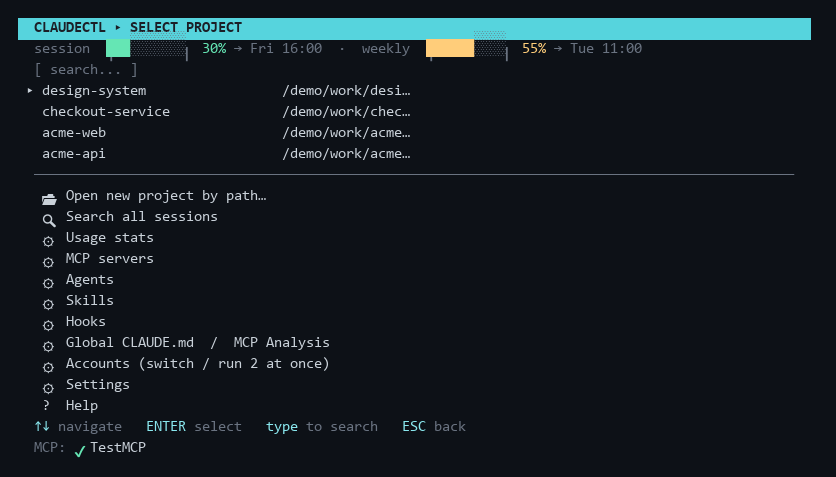
The list is every folder Claude Code has ever opened, most recent first. Type to filter
it live, then ENTER.
Above the list are quick-resume rows (★ most recent, ☆ older) — five sessions across all
projects. ENTER on one resumes that exact session and skips the rest of this page.
4. Give the project some context
First time in a project, press ! — one-key project setup. It scaffolds CLAUDE.md
from the repo's git history and READMEs, builds the memory graph, and writes
the per-module rules files. Everything AI-written is shown as a diff you
approve before a byte is written.
That step is optional and you can skip it, but it is the difference between a session that starts from nothing and one that starts knowing the codebase. It costs one Claude call and runs in the background — a desktop notification tells you when it is done.
5. Start the session
ENTER on New session opens the launch screen:
| Field | What it does |
|---|---|
| Effort | Reasoning effort for the run |
| Model | Overrides your default for this project |
| Permissions | --permission-mode — how much Claude may do unattended |
| Account | Which CLAUDE_CONFIG_DIR to launch under (multiple accounts) |
| Think cap / Subagents | MAX_THINKING_TOKENS and the model subagents run on |
| Worktree / Name | New sessions only — launch in a git worktree, name the session |
e applies the economy preset (Sonnet, 8k thinking cap, Haiku subagents) in one key.
ENTER launches. Claude Code opens in a real new console window; effort, model and
permission mode are remembered for this project.
Then what
- The session you just ran is now in the project's session list —
vreads its transcript,ttags it,fforks it,eexports it to markdown. See Sessions. ⇧Wshows the context weight audit: exactly what every turn is costing you across CLAUDE.md, rules, hooks and MCP schemas.n→oopens the architecture graph for the project.?prints the full key map. Or read Terminal UI for every screen.